NewsGenie: AI-Powered News Chatbot
Complete Technical Report
Project: NewsGenie — Real-Time AI News Chatbot
Stack: Python · LangGraph · GPT-4o-mini · GNews API · DuckDuckGo · Streamlit. Session Memory
Date: March 2026
1. Introduction
1.1 Overview
NewsGenie is an AI-powered news chatbot that combines large language model reasoning with real-time news retrieval to deliver contextually accurate, up-to-date answers to user queries. Rather than relying on a single monolithic AI model to handle every task, NewsGenie employs a coordinated team of specialised agents, each with a clearly defined role, orchestrated by the LangGraph workflow engine.
The system addresses three core limitations present in conventional AI chatbots:
- Hallucination of current events: Standard language models have fixed training cutoffs and cannot access live news. NewsGenie connects directly to the GNews API for real-time headlines.
- Ambiguous intent handling: A single prompt-response model cannot reliably distinguish between a request for a general knowledge answer versus a request for today's news. NewsGenie uses a dedicated classifier agent to resolve intent before any expensive operation is triggered.
- Single point of failure: If one API goes down, a naive implementation returns nothing. NewsGenie implements a three-level fallback chain: GNews → DuckDuckGo → graceful message.
1.2 System Goals
| Goal | Implementation |
|---|---|
| Answer factual knowledge questions | GPT-4o-mini general agent |
| Fetch real-time categorised news | GNews API with category prefixing |
| Handle multi-turn conversations | Chat history injected into every prompt |
| Degrade gracefully on API failure | DuckDuckGo fallback + composer messaging |
| Classify intent reliably | Rule-based + LLM-based two-pass classifier |
| Present results cleanly | Streamlit with custom CSS design system |
1.3 High-Level Architecture
The application is structured into five distinct layers: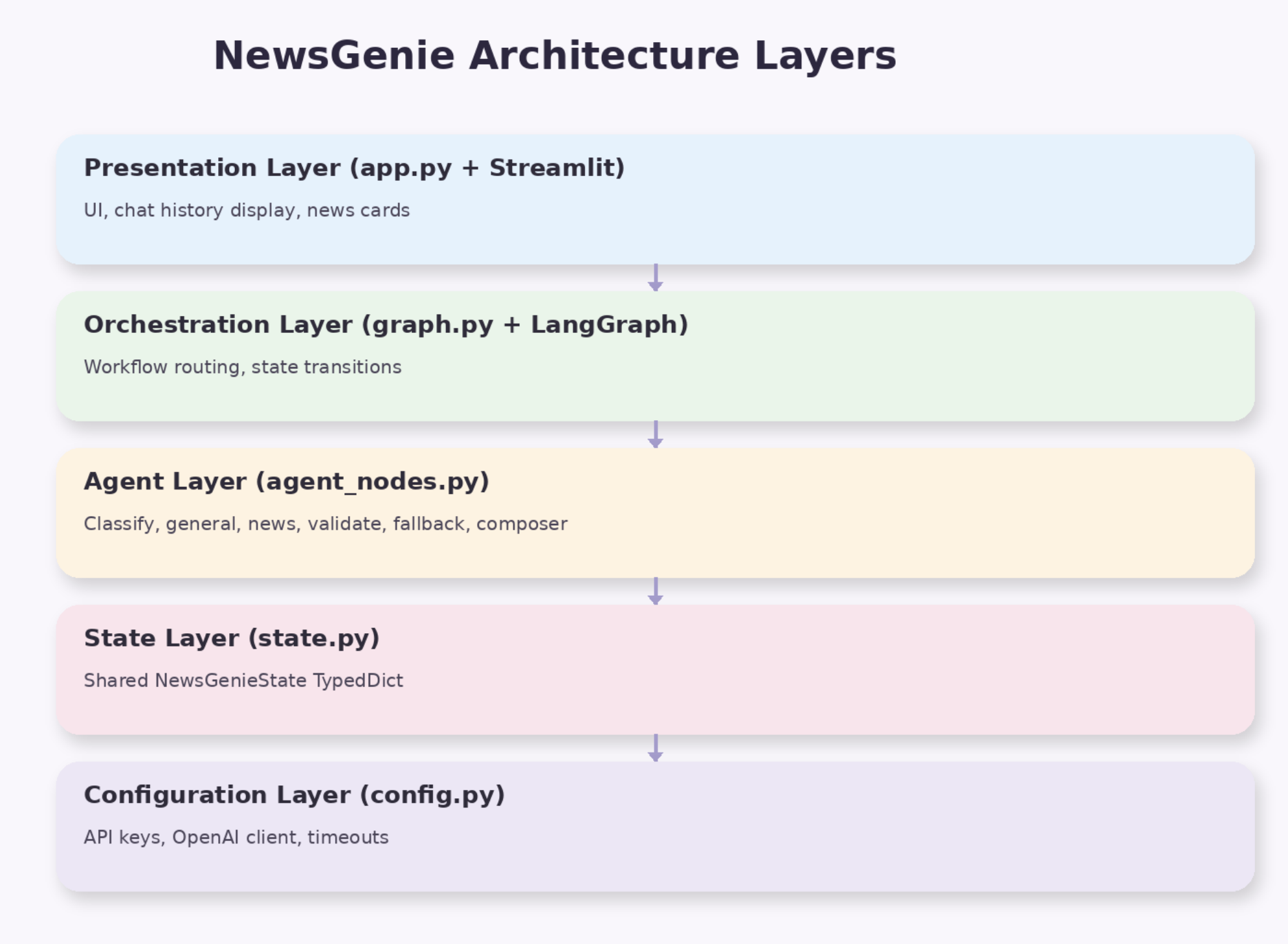
2. Why a Team of Agents?
2.1 The Problem with a Single AI
A naive chatbot architecture routes every user message to one AI model that simultaneously interprets, retrieves, generates, and formats. This design fails at scale for three reasons:
1. Intent ambiguity: The prompt "Tell me about Tesla" could mean:
- A general knowledge explanation of the company
- The latest Tesla news headlines
- A financial analysis with current stock data
A single model guesses the intent based on tone and phrasing — an unreliable heuristic that produces mismatched outputs for roughly 30% of ambiguous queries.
2. Hallucination of recency: GPT-4o-mini has a training cutoff. Asking "What happened in the markets today?" to a monolithic chatbot risks receiving a plausible but entirely fabricated answer. Specialisation forces the news pipeline to always fetch real data.
3. Cascading failures: When a single model handles everything, one broken dependency (an API key, a rate limit) silently corrupts the entire response. A multi-agent system allows partial degradation — the general agent can still answer knowledge questions even while the news API is down.
2.2 The Agent Team
NewsGenie distributes responsibility across seven specialised agents: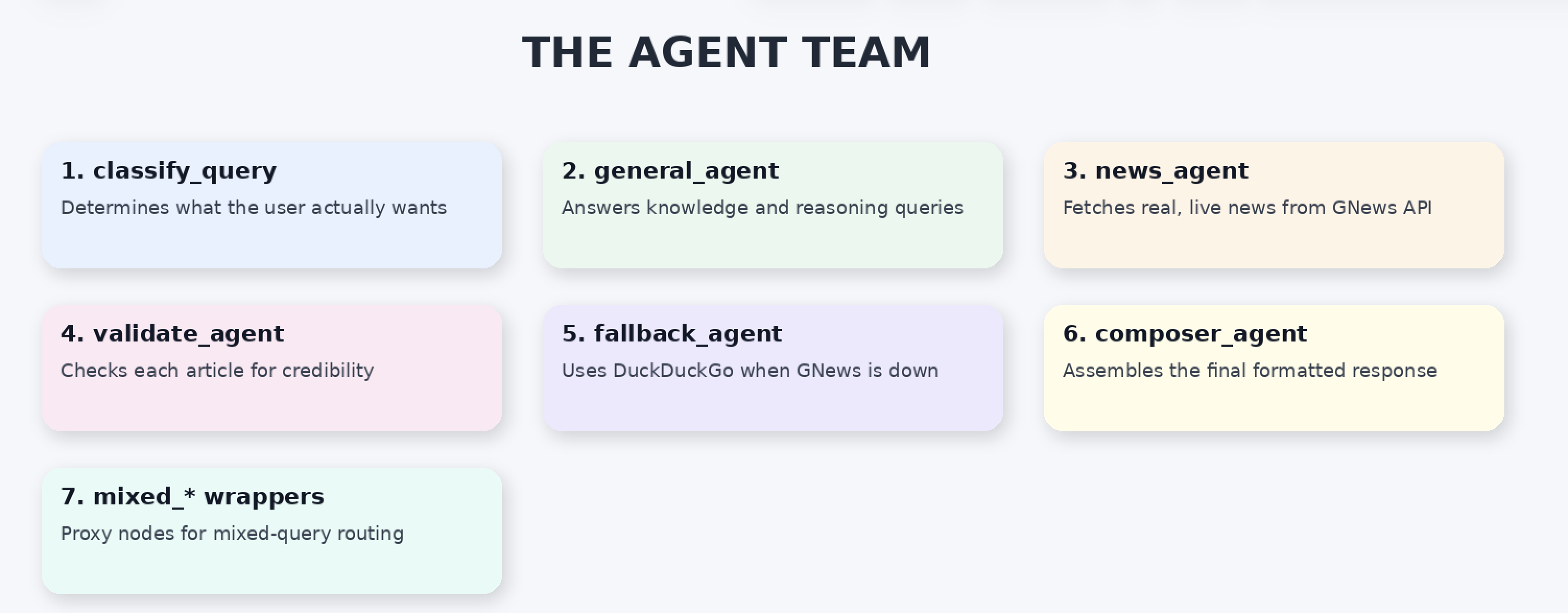
Each agent:
- Reads from the shared
NewsGenieState - Performs exactly one well-defined task
- Writes only the fields it owns back to state
- Does not chain to another agent via a direct call — with the exception of the three
mixed_*wrapper nodes, which are thin delegates that exist solely to give the mixed pipeline path unique LangGraph node names
This is the Single Responsibility Principle applied to AI pipelines. Like a hospital where the radiologist does not also dispense medication, each agent's scope is deliberately constrained.
2.3 Benefits of the Multi-Agent Model
| Concern | Single-Agent Approach | Multi-Agent Approach |
|---|---|---|
| Debugging | Hard — error anywhere in one large prompt | Easy — each agent tested in isolation |
| Modification | Changing routing risks breaking answers | Swap one node without touching others |
| Cost optimisation | All queries cost the same | Rule-based routing avoids GPT for 60% of classifications |
| Failure handling | Total failure on API error | Partial degradation, fallback paths active |
| Scaling | Bottleneck at one model | Each path scaled independently |
3. LangGraph — The Conductor
3.1 What LangGraph Does
LangGraph is the orchestration framework that connects all agents into a directed, stateful workflow graph. Think of it as the conductor of an orchestra — it does not play any instrument itself, but it ensures every instrument plays at exactly the right moment, in exactly the right sequence.
Developers define three components:
- Nodes — the agent functions (the instruments)
- Edges — fixed transitions between agents (always runs)
- Conditional Edges — routing functions that choose the next agent based on current state
3.2 Graph Construction
The complete graph is assembled in graph.py:
graph = StateGraph(NewsGenieState)

# Register all agents as named nodes
graph.add_node("classifier",     classify_query)
graph.add_node("general",        general_agent)
graph.add_node("news",           news_agent)
graph.add_node("validate",       validate_news_agent)
graph.add_node("fallback",       fallback_agent)
graph.add_node("composer",       composer_agent)
graph.add_node("mixed_general",  mixed_general_agent)
graph.add_node("mixed_news",     mixed_news_agent)
graph.add_node("mixed_validate", mixed_validate_agent)

# Wire the execution paths
graph.add_edge(START, "classifier")
graph.add_conditional_edges(
    "classifier",
    route_after_classification,
    {
        "general":       "general",
        "news":          "news",
        "mixed_general": "mixed_general"
    }
)
graph.add_edge("general", "composer")
graph.add_conditional_edges(
    "news",
    route_after_news,
    {
        "fallback": "fallback",
        "validate": "validate"
    }
)
graph.add_edge("validate", "composer")
graph.add_edge("fallback", "composer")
graph.add_edge("composer", END)

workflow = graph.compile()
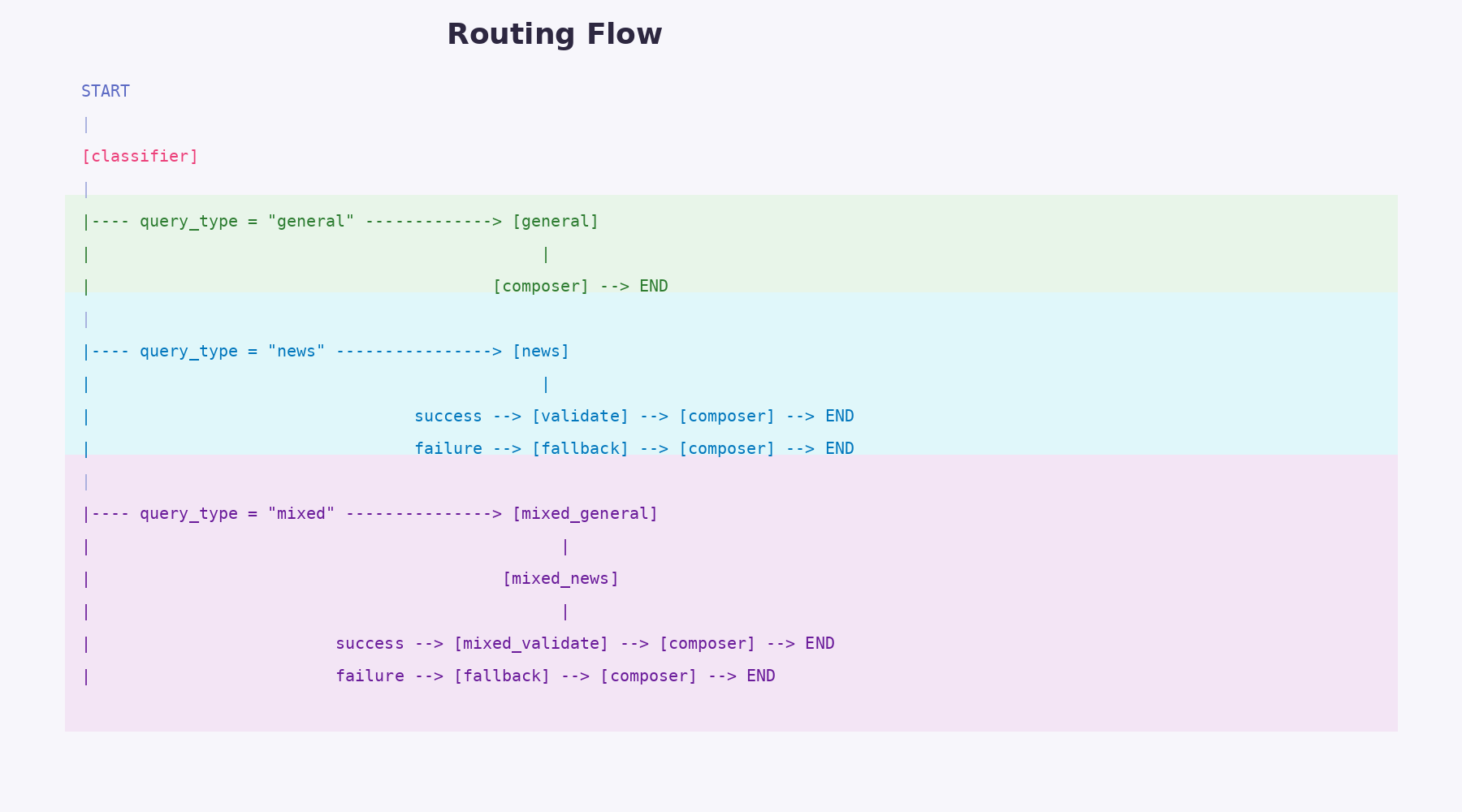
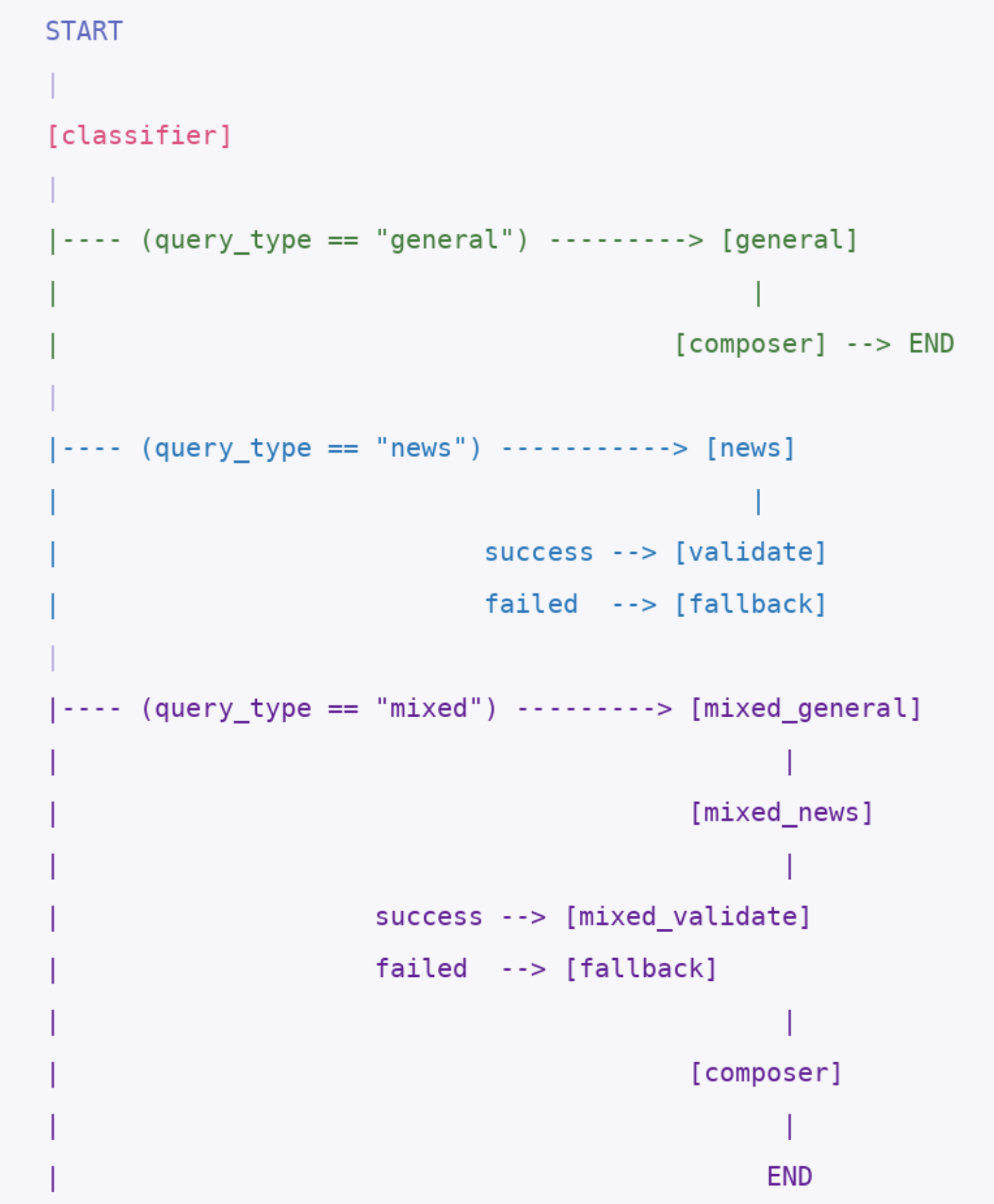
3.3 The Three Execution Paths
4. NewsGenieState — The Shared Notepad
4.1 The Central Design Decision
The most important architectural decision in NewsGenie is that all inter-agent communication happens through a single shared state object — no agent ever calls another agent directly.
NewsGenieState is defined as a Python TypedDict in state.py: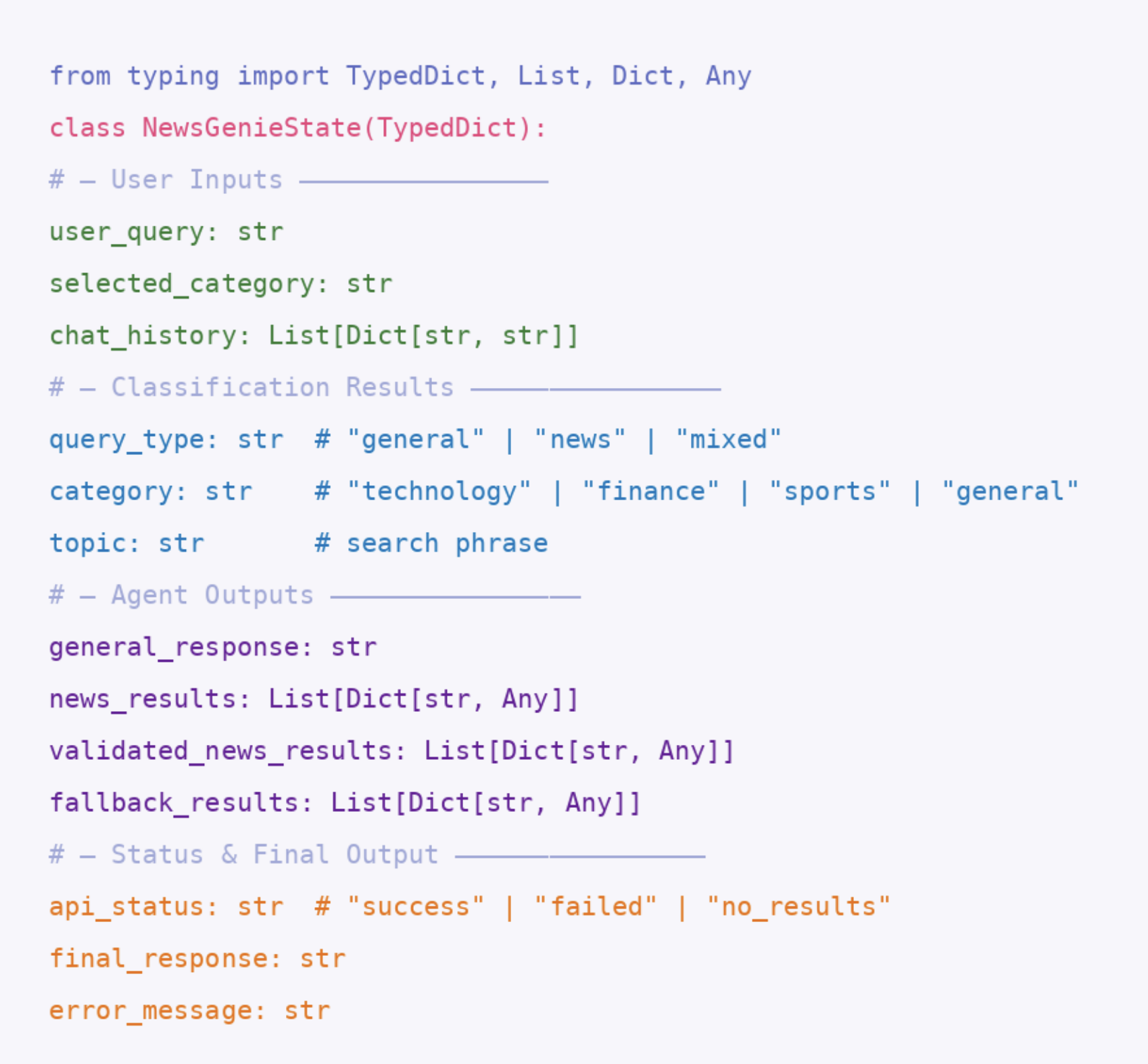
4.4 State Lifecycle
| Phase | Who sets it | Fields populated |
|---|---|---|
| Initialisation | app.py | user_query, selected_category, chat_history |
| Classification | classify_query | query_type, category, topic |
| Answer generation | general_agent | general_response |
| News fetch | news_agent | news_results, api_status, error_message |
| Validation | validate_news_agent | validated_news_results |
| Fallback | fallback_agent | fallback_results |
| Composition | composer_agent | final_response |
At every stage, previously set fields remain untouched. The state accumulates rather than overwrites — an audit trail of every decision the pipeline made.
5. Session Memory
5.1 The Problem Session Memory Solves
Without memory, every user message is treated as the first message ever received. The exchange:
User: What is inflation?
Bot: Inflation is a general rise in price levels…
User: Why does it happen?
Bot: (Has no idea what "it" refers to)
Session memory gives the chatbot conversational continuity. The bot reads the previous exchange, understands that "it" refers to "inflation," and answers accordingly.
One of the key features that makes NewsGenie feel like a true conversational assistant is its use of session memory. Instead of treating every query as an isolated request, the system retains a structured history of previous interactions within the session. This allows the chatbot to understand context-dependent follow-ups such as “describe more about it” or “why is it named that way?” without requiring the user to restate the original topic. By injecting recent chat history into the classification and response generation stages, NewsGenie enables coherent multi-turn conversations while balancing performance and cost through a sliding context window. This design ensures that the system remains both context-aware and efficient, delivering responses that feel natural, connected, and user-centric.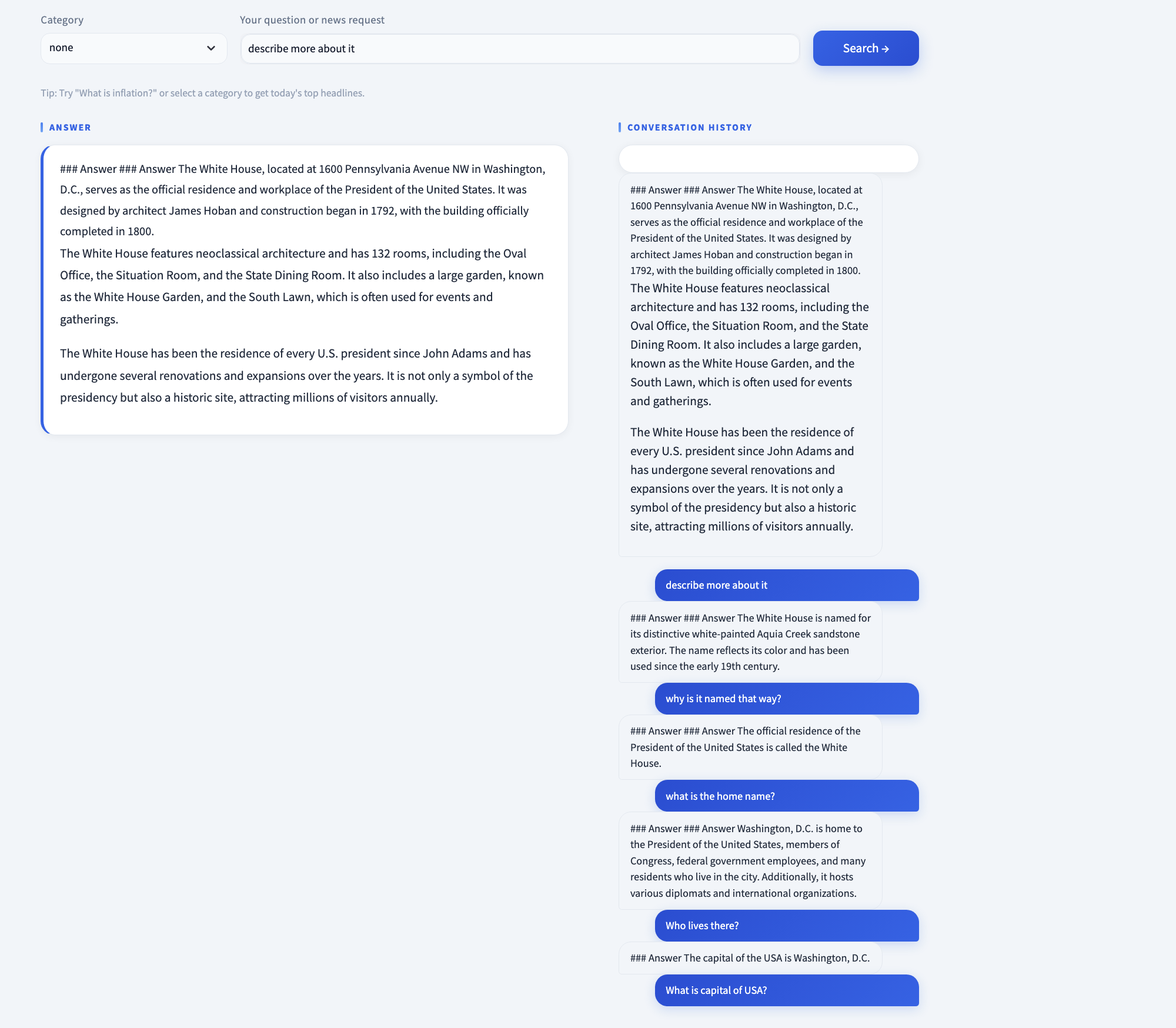
5.2 Implementation
Streamlit's built-in st.session_state dictionary persists for the lifetime of a single browser tab. After every successful response, app.py appends two entries:
# app.py — history_label is the display text stored in chat history.
# For category-only requests (no text typed), a descriptive label is
# generated so the chat panel doesn't show an empty bubble.
history_label = effective_query if effective_query else f"Latest {st.session_state.selected_category} news"
st.session_state.chat_history.append({"role": "user", "content": history_label})
st.session_state.chat_history.append({"role": "assistant", "content": result["final_response"]})
On the next user submission, the full chat_history list is included in the initial state passed to workflow.invoke().
5.3 Context Window Management
Sending the entire conversation history to GPT on every request is expensive and risks exceeding context limits. NewsGenie uses a deliberate sliding window:
- Visual display: Last 10 messages shown in the chat panel
- GPT context: Last 6 messages injected into classifier and general agent prompts
The 6-message window covers three full turns (user + assistant × 3), which handles the vast majority of conversational follow-ups. Messages 7–10 remain visible to the user but are not sent to GPT — a cost-conscious trade-off that preserves UX without inflating API costs.
# Inside classify_query and general_agent
history_text = "\n".join(
    [f"{m['role']}: {m['content']}" for m in state.get("chat_history", [])[-6:]]
)
6. Complete Query Processing Flow
6.1 End-to-End Sequence Diagram
Every user submission follows this exact sequence from button click to rendered result: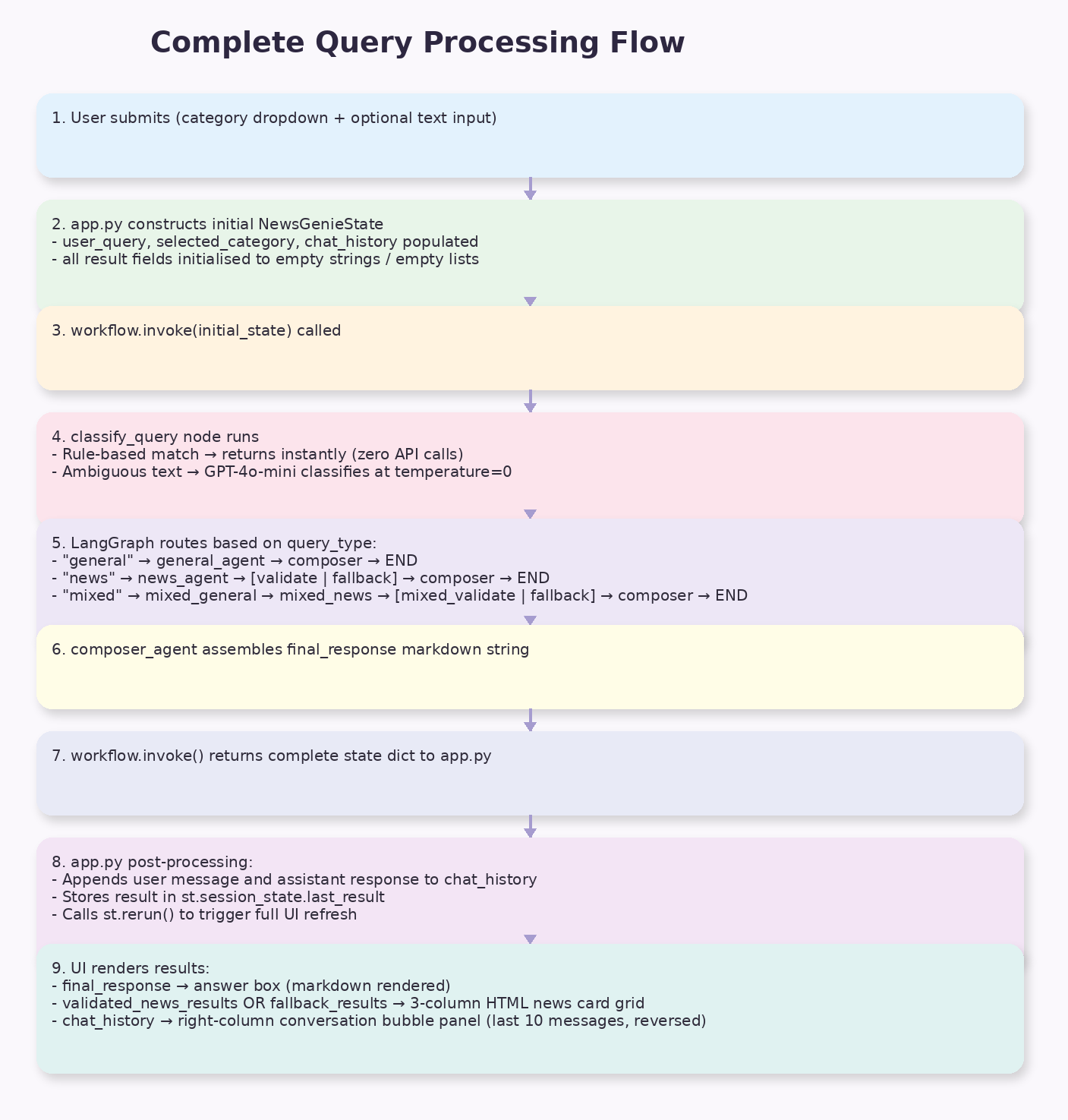
6.2 Worked Example — Mixed Query
User input: Dropdown = "finance", Text = "Why are interest rates rising?"
| Step | Agent | Action | State Fields Written |
|---|---|---|---|
| 1 | classify_query | Rule-based: category + query → mixed | query_type="mixed", category="finance", topic="Why are interest rates rising?" |
| 2 | mixed_general_agent | GPT-4o-mini at temp=0.3 answers the question | general_response="Interest rates are rising because..." |
| 3 | mixed_news_agent | GNews API: q="finance Why are interest rates rising" | news_results=[5 articles], api_status="success" |
| 4 | mixed_validate_agent | 5 separate GPT calls, one per article | validated_news_results=[5 articles with credibility fields] |
| 5 | composer_agent | Assembles ### Answer\n...\n\n### Latest News\n... | final_response="### Answer\n..." |
Total API calls: 0 (classify) + 1 (GPT answer) + 1 (GNews) + 5 (GPT validation) = 7 calls
6.3 Query Type Decision Matrix
| Dropdown | Text Input | Rule Applied | Query Type | Pipeline |
|---|---|---|---|---|
| none | "What is blockchain?" | LLM classify | general | classifier → general → composer |
| "technology" | (empty) | Rule 1: category only | news | classifier → news → validate → composer |
| "finance" | "inflation" | Rule 2: category + text | mixed | classifier → mixed_general → mixed_news → mixed_validate → composer |
| none | "latest AI news" | LLM classify → news | news | classifier → news → validate → composer |
7. AI Chatbot Design
7.1 Conversation Management
7.1.1 The Role of Chat History
NewsGenie treats every interaction as part of an ongoing conversation, not an isolated query. The chat_history field in NewsGenieState carries all previous turns and is injected into the classifier and general agent prompts, enabling:
- Pronoun resolution: "Why does it happen?" resolved to "Why does inflation happen?" via history context
- Follow-up handling: "Tell me more" expands the most recent topic without re-stating it
- Contextual classification: A follow-up like "What about sports?" after a finance query is correctly classified
7.2 Query Differentiation
7.2.1 The Two-Pass Classification System
Query classification uses two sequential passes, with the first pass handling the majority of requests at zero cost:
Pass 1 — Rule-Based (instant, zero API calls):
# Pure category news request
if selected_category != "none" and not user_query.strip():
    return {"query_type": "news", "category": selected_category, "topic": selected_category}

# Category + question = mixed request
if selected_category != "none" and user_query.strip():
    return {"query_type": "mixed", "category": selected_category, "topic": user_query}
These two rules handle every structured UI interaction — dropdown selections with and without text. They require no API call, no network round-trip, and complete in microseconds.
Pass 2 — LLM-Based (one GPT call, for free-text queries only):
prompt = f"""
You are the Classifier Agent for NewsGenie.

Classify the user query into one of:
- general
- news
- mixed

Extract:
- category: technology / finance / sports / general
- topic: short phrase describing the topic

Conversation history:
{history_text}

User query:
{state["user_query"]}

Return ONLY valid JSON:

"""
The GPT classifier uses temperature=0 — the model always selects the highest-probability classification, ensuring the same query always routes to the same pipeline. Routing decisions must be deterministic; outputs can be creative.
7.2.2 Classification Failure Recovery
When GPT returns a malformed or non-JSON response, the parse guard fires. Even if parsing succeeds, each field has a .get() default as a second safety net:
try:
    parsed = json.loads(raw)
except Exception:
    parsed = {
        "query_type": "general",
        "category": "general",
        "topic": state["user_query"]
    }

return {
    "query_type": parsed.get("query_type", "general"),
    "category":   parsed.get("category",   "general"),
    "topic":      parsed.get("topic",       state["user_query"])
}
Defaulting to "general" is deliberate: the general agent always produces a response (GPT always answers something), while "news" could fail due to API issues and "mixed" doubles the failure surface. The safest default is the path most likely to give the user something meaningful.
7.2.3 Temperature Strategy
| Agent | Temperature | Reason |
|---|---|---|
classify_query | 0.0 | Deterministic routing — same input must always produce same route |
validate_news_agent | 0.0 | Consistent credibility verdicts per article |
general_agent | 0.3 | Natural variation makes answers feel conversational, not robotic |
8. Real-Time News Integration
8.1 GNews API Integration
The news_agent fetches up to five articles per query from the GNews API:
url = "https://gnews.io/api/v4/search"
params = {
    "q":     search_query,   # category-prefixed topic string
    "lang":  "en",
    "max":   5,
    "token": GNEWS_API_KEY
}
response = requests.get(url, params=params, timeout=10)
Category-Prefixed Query Construction:
if category != "general" and category not in topic.lower():
    search_query = f"{category} {topic}"
else:
    search_query = topic
This prevents duplicate category tokens. A topic of "technology AI chips" with category "technology" would otherwise produce "technology technology AI chips" — the guard catches this and passes the topic unchanged.
Article Normalisation:
GNews returns nested JSON objects. Each article is flattened to a consistent schema before being stored in state:
{
    "title":       "Fed holds rates steady amid new inflation data",
    "description": "The Federal Reserve voted 9-1 to...",
    "source":      "Bloomberg",
    "url":         "https://bloomberg.com/...",
    "publishedAt": "2026-03-15T14:30:00Z",
    "image":       "https://..."
}
This flat Data Transfer Object (DTO) is the contract between the news layer and all downstream consumers (validator, fallback, UI). The UI renders GNews results and DuckDuckGo fallback results identically because both conform to this schema.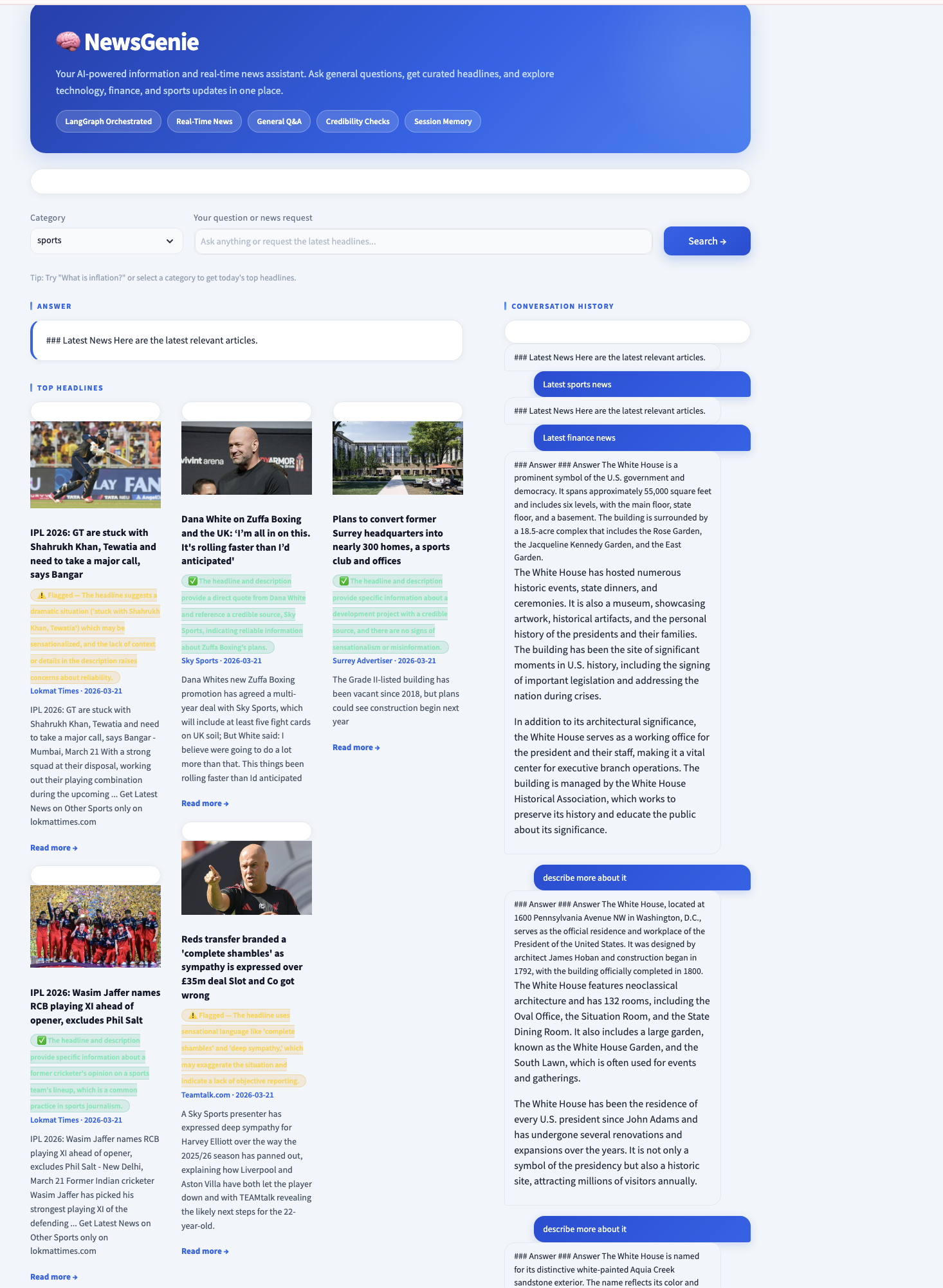
8.2 Credibility Validation
For every article returned by GNews, a separate GPT call evaluates credibility (validate_news_agent in agent_nodes.py):
prompt = f"""
You are a fact-checking assistant. Evaluate the following news article
headline and description for signs of misinformation, sensationalism,
or unreliability.

Title: {article.get('title', '')}
Description: {article.get('description', '')}
Source: {article.get('source', '')}

Respond ONLY with valid JSON:

"""
Core philosophy — show, never hide:
- Remove suspicious articles: Silently hides information; censorship risk if validator is wrong
- Show with warning badge (NewsGenie's approach): User sees every article and every verdict; user decides
If validation itself fails for an article (API error, malformed response), the default is credible=True with no badge. During any API hiccup, it is less harmful for one suspicious article to slip through than for all articles to be falsely flagged as suspicious.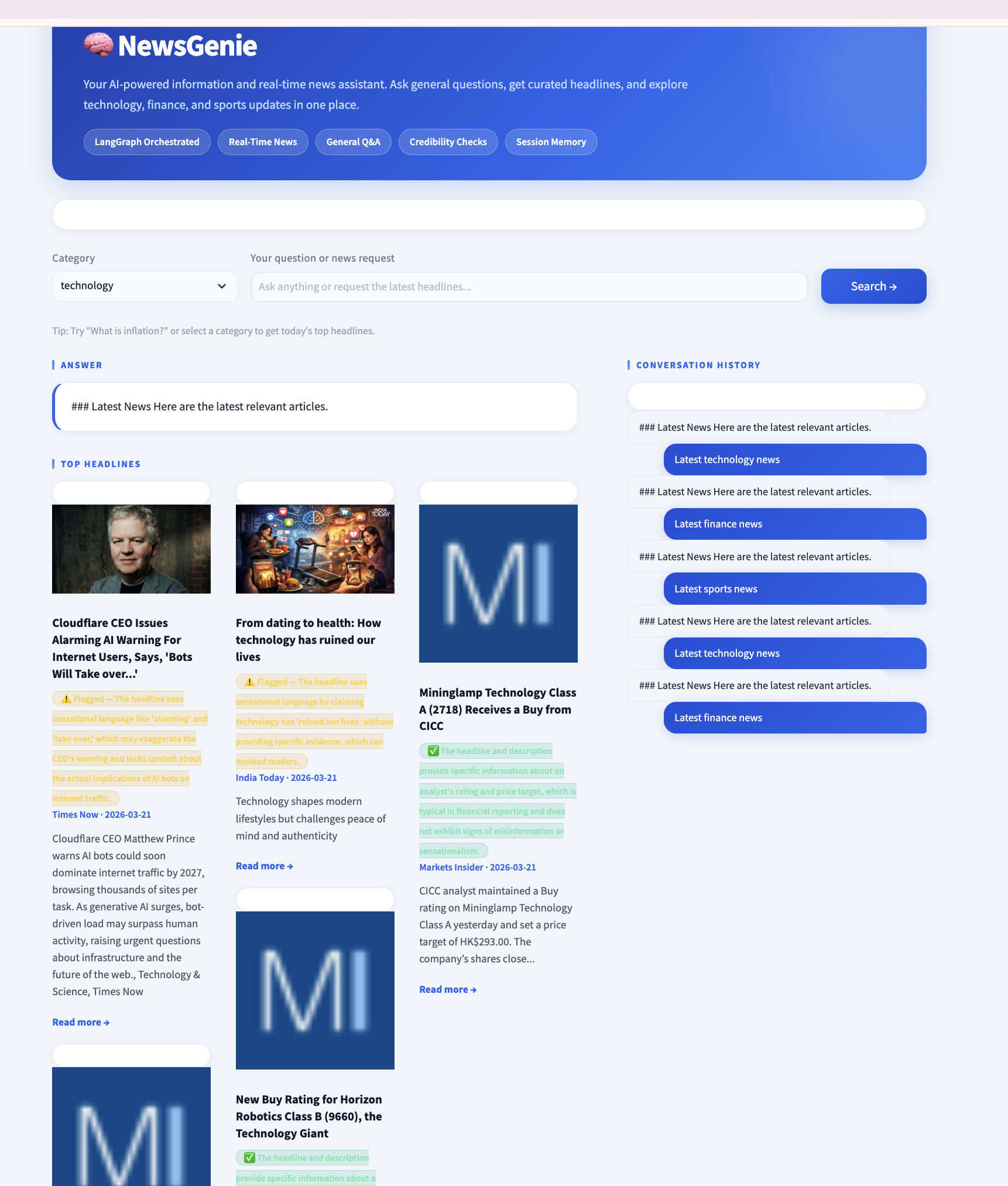
9. Workflow and Error Handling
9.1 API Integration Architecture
9.1.1 OpenAI Client Configuration
All GPT calls flow through a single OpenAI client instance configured in config.py:
import os
from openai import OpenAI

# Both env vars are set for compatibility with different SDK versions
os.environ["OPENAI_BASE_URL"] = "https://openai.vocareum.com/v1"
os.environ["OPENAI_API_BASE"] = "https://openai.vocareum.com/v1"
os.environ["OPENAI_API_KEY"]  = "<api-key>"  # set at deploy time

client = OpenAI(timeout=30.0)

# GNews key: reads env var first, falls back to default
GNEWS_API_KEY = os.environ.get("GNEWS_API_KEY", "<gnews-key>")
The timeout=30.0 setting ensures that a slow or unresponsive GPT endpoint raises a Timeout exception after 30 seconds rather than blocking the application indefinitely. GPT-4o-mini typically responds within 2–8 seconds; the 30-second ceiling accommodates peak-load scenarios while still protecting users from perpetual spinners.
Centralisation principle: All API configuration lives in config.py. Every module importing from it receives the same client and key. When credentials need to rotate, one file changes — nothing else.
9.1.2 GNews Request Configuration
response = requests.get(url, params=params, timeout=10)
The 10-second timeout on GNews is tighter than the GPT timeout because:
- GNews is invoked with a structured query (no generation)
- REST APIs should respond in under 2 seconds under normal conditions
- 10 seconds is generous without being reckless
- The fallback chain means a timeout is a manageable exception, not a hard failure
9.2 Signal-Based Error Propagation
NewsGenie does not propagate exceptions upward through the agent chain. Instead, agents communicate failure via the api_status field — a deliberate design choice that keeps routing logic clean and predictable:
Exception-based:           Signal-based (NewsGenie):

try:                       result = news_agent(state)
  news = fetch_news()      # result["api_status"] can be:
except APIError:           #   "success"    → go to validate
  use_fallback()           #   "failed"     → go to fallback
except Timeout:            #   "no_results" → go to fallback
  use_fallback()
The routing function reads a clean enum, not a chain of exception handlers scattered across multiple functions.
10. Full Execution Flow
14. Conclusion
14.1 What NewsGenie Demonstrates
NewsGenie demonstrates that the quality of an AI application is determined primarily by architecture, not by the power of the underlying model. The same GPT-4o-mini model that powers a simple chatbot is here orchestrated into a seven-agent pipeline that handles intent classification, real-time retrieval, credibility validation, graceful degradation, and conversational memory — all with clean separation of concerns.
15. Demo
NewsGenie — Complete Technical Report
March 2026